Enphase Troubleshooting: Fixing Gateway and Communication Issues in Spring

Spring in Florida is a period of high productivity for solar energy systems, but it also presents unique technical challenges for smart energy monitoring. For homeowners utilizing the industry-leading Enphase microinverter technology, maintaining a seamless connection between the rooftop array and the monitoring gateway is essential for tracking efficiency and ensuring system health. At GC Solar & Electric, we specialize in high-density technical diagnostics, specifically focusing on Enphase troubleshooting to resolve the communication errors that often emerge during the transition from the dry winter to the humid spring season.
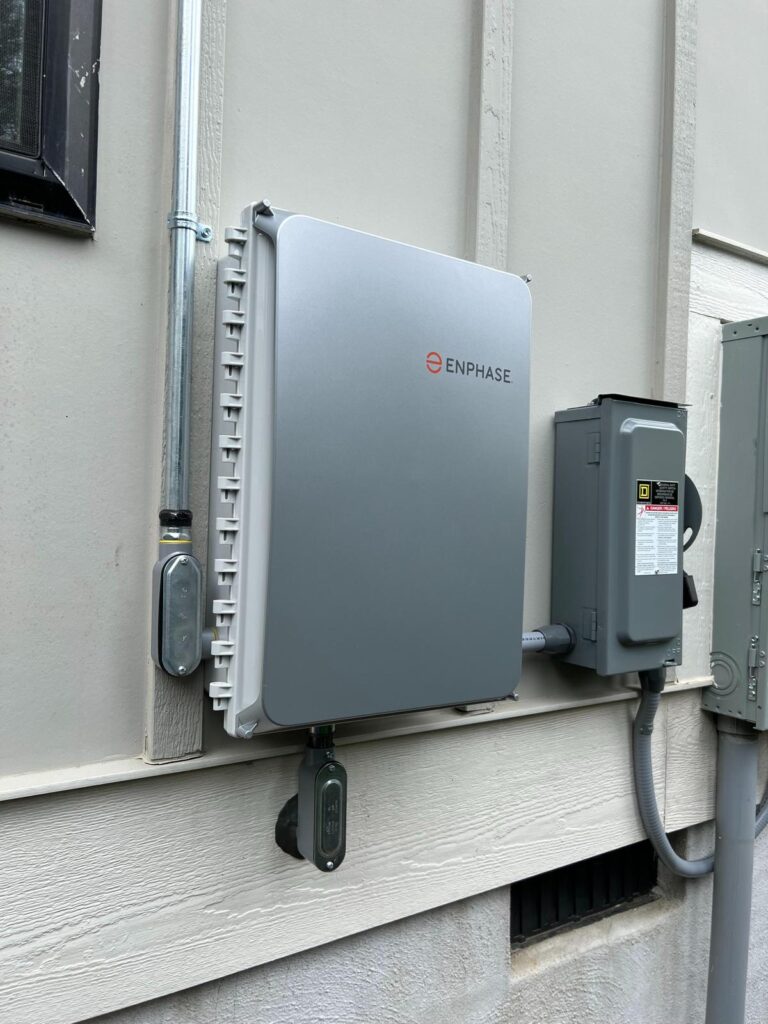
The Architecture of Enphase Communication: PLC and Zigbee

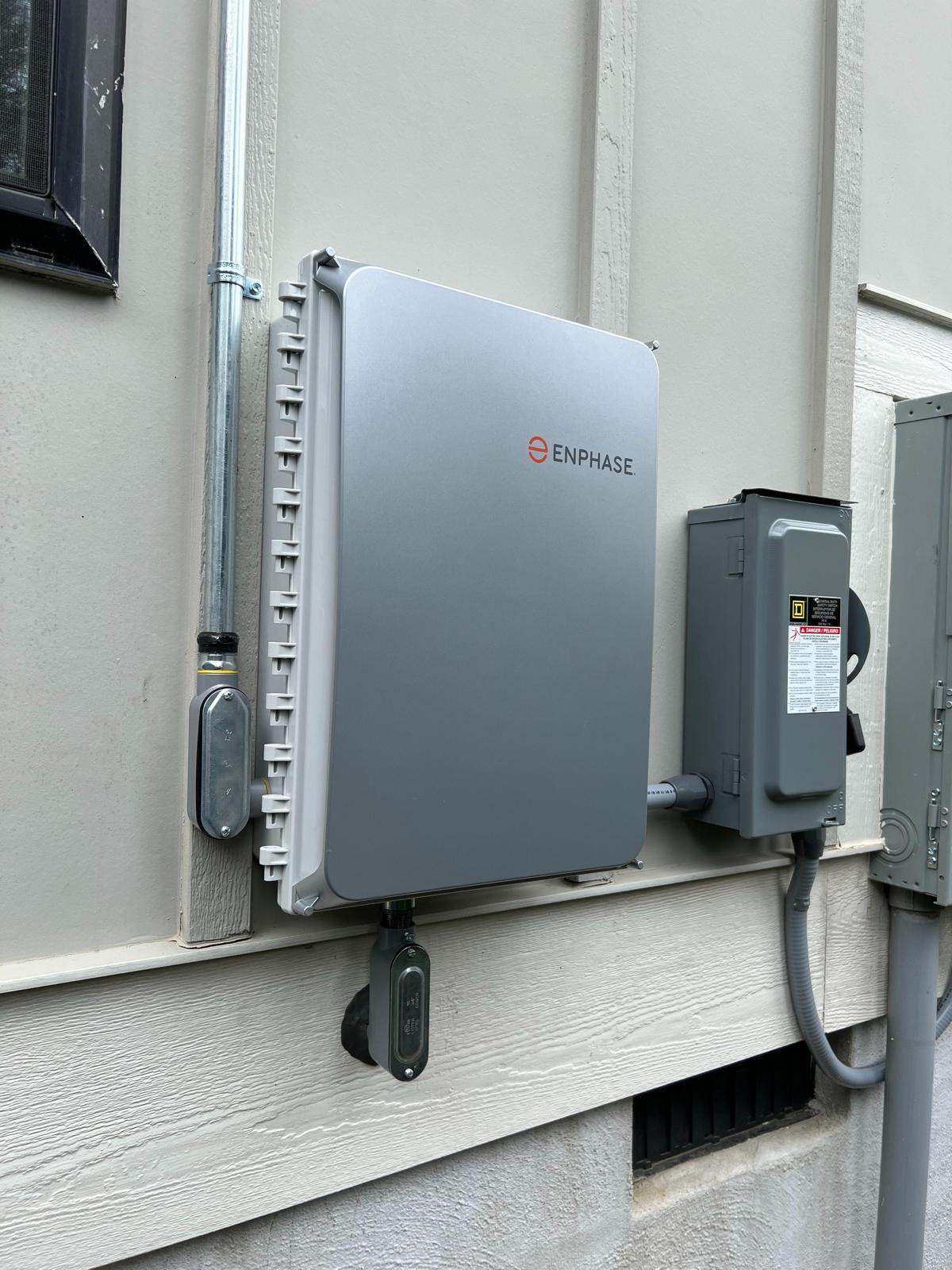
To master Enphase troubleshooting, one must understand how these systems communicate. Unlike traditional string inverters, Enphase microinverters use Power Line Communication (PLC) to send data from the roof to the Envoy (now called the Enphase Gateway). This data travels through the existing electrical wiring of your home. Additionally, for systems using Enphase batteries or specific smart sensors, a Zigbee wireless mesh network is often employed.


During the spring, several environmental factors can interfere with these signals. Increased humidity can affect the impedance of electrical lines, and the introduction of new household appliances common during spring cleaning or home renovations can introduce “line noise.” This noise disrupts the PLC signal, leading to the dreaded “Microinverters Not Reporting” status on the Enlighten app. A solar panel technician near me is often required to install noise filters or re-phase the Gateway to ensure it is on the same electrical leg as the solar strings, a technical nuance that is critical for sustained solar service reliability.


Common Springtime Communication Failures

The spring season in Miami-Dade often involves intense thunderstorms that can cause minor grid fluctuations. These fluctuations can sometimes cause the Enphase Gateway to lose its connection to the local Wi-Fi or cellular network. While the system may still be producing energy, the lack of data reporting prevents homeowners from seeing their real-time savings.


1. Gateway Connectivity Issues

The Enphase Gateway is the “brain” of the system. If it shows a solid red light or a flashing green light, it indicates a network error. Enphase troubleshooting starts with a power cycle of the Gateway. However, if the issue persists, it may be due to signal attenuation. As foliage grows back in the spring, trees near the home can sometimes interfere with cellular signals if the system relies on a cell modem. A local solar service expert can assess whether a Wi-Fi range extender or a hardwired Ethernet connection is necessary to stabilize the data flow.


2. Device Discovery and Database Errors

Sometimes, after a power surge from a spring storm, the Gateway may “forget” the mapping of the microinverters. This requires a professional Enphase repair where the technician must log in to the Installer Toolkit to re-provision the devices. This isn’t just a software fix; it often involves verifying the physical serial numbers on the roof to ensure the digital map matches the physical layout. This level of detail is why hiring certified solar technicians Miami-Dade is a necessity rather than an option for high-tech Enphase systems.


The Importance of Professional Enphase Repair and Installation

When it comes to Enphase installing, the initial configuration dictates the long-term stability of the communication network. Systems that were not installed with dedicated sub-panels or proper filtering are much more likely to suffer from communication drops. At GC Solar & Electric, we often perform “corrective Enphase repair” on systems installed by other companies that failed to account for electrical interference.


A professional solar panel technician near me will check the Ferrite toroids (noise suppressors) and ensure that the Gateway is not plugged into a power strip or an outlet shared with high-interference devices like vacuum cleaners or LED dimmers. By isolating the Gateway’s power supply, we can eliminate up to 90% of PLC communication issues, ensuring your spring energy harvest is recorded accurately down to the last watt.


Advanced Diagnostics: Using the Installer Toolkit

For complex cases of Enphase troubleshooting, we utilize the Enphase Installer Toolkit to analyze the “Signal-to-Noise Ratio” (SNR). If the SNR is too low, the microinverters will struggle to “talk” to the Gateway. This technical diagnostic allows us to pinpoint exactly which branch of the solar array is experiencing interference. In some cases, a single faulty microinverter can “pollute” the communication line for the entire system. Identifying and replacing that specific unit is part of our comprehensive maintenance of solar panels Florida, preventing a minor hardware glitch from compromising your entire monitoring experience.


FAQs About Enphase Troubleshooting

Does “Microinverters Not Reporting” mean my system is off? 

Not necessarily. Usually, the panels are still producing power, but the data is not reaching the Gateway for you to see on your app.


How do I restart my Enphase Gateway? 

You can usually find the Gateway in your sub-panel or a dedicated box. Turn off the breaker for 30 seconds and then turn it back on.


Why did my communication fail after I bought a new appliance? 

Large appliances can create “noise” on your home’s electrical lines that interferes with the PLC signal used by Enphase.


Can I perform an Enphase repair myself? 

While you can restart the Gateway, re-provisioning microinverters or fixing wiring issues requires a certified solar technician Miami-Dade.


How does spring weather affect Enphase communication? 

Increased moisture can affect electrical connections, and lightning surges can desync the Gateway from your home network.

 

Solar Energy Solutions Florida: Federal and State Updates for Homeowners in 2026

The landscape of renewable energy in the United States has undergone a significant transformation as we enter the second quarter of 2026. For residents of the Sunshine State, the convergence of advanced technology and robust financial incentives has made the adoption of solar energy solutions Florida more accessible than ever before. Understanding the current regulatory environment is crucial for any homeowner looking to transition toward energy independence. With the extension of specific federal tax credits and the introduction of new state-level performance programs, the return on investment (ROI) for a high-quality solar panel for home system has reached an all-time high, often neutralizing the initial capital outlay much faster than in previous years.

At GC Solar & Electric, we stay at the forefront of these policy shifts to ensure our clients maximize every available dollar. A professional solar panel installer must be more than just a technician; they must act as a financial consultant who navigates the complexities of the Inflation Reduction Act (IRA) and Florida’s specific net-metering policies. By partnering with GC Solar & Electric, you gain access to a team that integrates these incentives into a cohesive, high-performance energy strategy. You can explore our updated 2026 incentive guide at www.gcsolarelectric.com


The Federal ITC and New Bonus Credits in 2026

The centerpiece of any financial analysis for solar energy solutions Florida remains the Federal Investment Tax Credit (ITC). In 2026, homeowners can still claim a 30% credit on the total cost of their solar installation, including equipment, labor, and even necessary electrical upgrades like a Main Panel Upgrade (MPU). However, what makes this year unique are the “bonus add-ons” for systems that incorporate American-made components or are located in specific “energy communities.” At GC Solar & Electric, we prioritize sourcing high-efficiency modules that meet these criteria, potentially increasing the tax benefits for our customers.


Furthermore, the integration of off-grid solar systems or hybrid setups with battery storage now falls under a more streamlined tax category. As of 2026, stand-alone battery storage systems with a capacity of at least 3 kWh are also eligible for the full 30% tax credit, regardless of whether they are charged by the sun or the grid. This policy change, which GC Solar & Electric has championed, allows for greater flexibility in building a resilient home power plant that can withstand the unpredictability of the Atlantic hurricane season.


Florida State Incentives and Local Property Tax Exemptions

While federal credits provide the largest “lump sum” benefit, Florida’s state-level protections are what secure the long-term value of your solar panel for home. One of the most important legislative victories for Florida homeowners in 2026 is the continued preservation of the Renewable Energy Property Tax Exemption. This ensures that the added value of a solar installation is not factored into your property tax assessment. In a booming real estate market like Miami, where a solar system can increase property value by 4% to 6%, this exemption represents thousands of dollars in savings over the life of the system.


Additionally, the Sales Tax Exemption on solar hardware remains a permanent fixture in Florida. When you hire a solar panel installer like GC Solar & Electric, you are not charged the 6% state sales tax on your panels, inverters, or mounting hardware. This “instant rebate” significantly lowers the barrier to entry for premium off-grid solar systems. When searching for “solar technicians near me,” it is vital to select a company that transparently reflects these exemptions in their initial quotes, ensuring there are no hidden costs during the permitting phase.


Engineering Excellence and Grid Resilience

In the second quarter of 2026, the focus of solar energy solutions Florida has shifted from simple “energy production” to “energy management.” Homeowners are increasingly demanding systems that can communicate with the smart grid. GC Solar & Electric leads the industry by implementing AI-driven inverters that optimize energy consumption based on real-time utility rates. For those utilizing net-metering, this means selling power back to Florida Power & Light (FPL) at the most advantageous times, effectively turning your roof into a revenue-generating asset.


The technical proficiency of GC Solar & Electric extends to the physical resilience of the installation. Our systems are engineered to surpass the current 2026 Miami-Dade wind-load requirements. By using “hurricane-hardened” mounting technology, we ensure that your investment is protected against the mechanical stresses of tropical storms. This level of durability is why GC Solar & Electric is often the preferred solar panel installer for luxury coastal properties that require both aesthetic integration and industrial-strength reliability.


The Path to Autonomy with GC Solar & Electric

Choosing the right partner for your solar journey is a decision that affects your home’s safety and your financial future. GC Solar & Electric is committed to providing solar energy solutions Florida residents can rely on for decades. We don’t just bolt panels to your roof; we design custom energy ecosystems that leverage every federal and state incentive available in 2026. Whether you are interested in a grid-tied system to eliminate your monthly bill or a robust off-grid solar systems configuration for total independence, our team of experts is ready to assist. Visit www.gcsolarelectric.com today to schedule a consultation and see how much you can save under the current Q2 2026 guidelines.


FAQs About Solar Energy Solutions Florida

What is the current Federal Solar Tax Credit in 2026?

The ITC remains at 30% for 2026. GC Solar & Electric helps you document all eligible expenses, including battery storage and electrical upgrades, to ensure you claim the maximum amount.


Do off-grid solar systems qualify for the same incentives as grid-tied systems?

Yes. Under the current 2026 federal guidelines, both off-grid and hybrid systems qualify for the 30% tax credit, including the cost of battery banks and specialized inverters.


How does GC Solar & Electric handle the property tax exemption in Florida?

Florida law automatically exempts the value of solar equipment from property taxes. GC Solar & Electric provides the necessary technical documentation to ensure your local appraiser applies this exemption correctly.


Why should I look for solar technicians near me who understand Miami-Dade codes?

Miami-Dade has the strictest wind-load requirements in the world. Only a specialized solar panel installer like GC Solar & Electric can guarantee that your system meets the HVHZ (High Velocity Hurricane Zone) standards for 2026.


Is the Florida sales tax exemption still active for solar panel for home?

Absolutely. Solar equipment is 100% exempt from Florida sales tax. GC Solar & Electric passes this 6% saving directly to the customer in every proposal.


Off-Grid Solar Systems: How to Transition Your Home for Full Energy Autonomy

The conversation surrounding renewable energy in the Sunshine State has shifted from simple utility bill reduction to a more profound goal: complete energy independence. For many homeowners, the ultimate expression of this independence is the move toward off-grid solar systems. This transition represents a significant step beyond standard grid-tied setups, offering a level of security and autonomy that is particularly valuable in a region prone to grid instability during hurricane season. At GC Solar & Electric, we specialize in guiding homeowners through the technical complexities of scalability, transforming a basic solar panel for home setup into a robust, self-sustaining power plant.

Understanding the Leap to Off-Grid Solutions

A standard grid-tied system is designed to supplement your energy needs, sending excess power back to the utility grid through net metering. However, these systems are legally and technically required to shut down during a power outage to prevent “back-feeding” the lines while utility crews are working. This means that without a battery backup, a home with solar panels is still vulnerable to blackouts. Transitioning to off-grid solar systems changes this dynamic entirely.


By integrating advanced battery storage such as lithium-iron-phosphate (LFP) technology and sophisticated charge controllers, your home can operate independently of the municipal grid. When searching for solar technicians near me, it is crucial to find experts who understand the nuances of load calculation. An off-grid system must be sized not just for average consumption, but for peak demand and “days of autonomy” the period the system can run without significant sunlight. This high-density technical planning is what defines the premium residential solar panel service provided by local experts.


The Scalability Path: Starting Small and Growing Large

Not every homeowner is ready to go fully off-grid on day one. Scalability is a core advantage of modern solar energy solutions Florida. Many of our clients at GC Solar & Electric begin with a “grid-hybrid” or “grid-aware” system. This approach involves installing a high-capacity solar array and a central inverter that is compatible with future battery integration.


As your energy needs evolve perhaps due to the addition of an electric vehicle (EV) or the desire to power a guest house the system can be expanded. A local solar panel for home expert can add more strings of panels and additional battery modules without needing to replace the entire existing infrastructure. This modular approach ensures that your initial investment is never wasted and that your path to energy autonomy is both financially manageable and technically sound.


Residential Solar Panel Service: The Technical Backbone of Autonomy

Maintaining an off-grid system requires a more rigorous residential solar panel service schedule than a standard setup. In a grid-tied system, the utility acts as your “infinite battery.” In an off-grid configuration, the health of your battery bank and the efficiency of your DC-to-AC conversion are paramount.


Localized solar technicians near me are essential for this level of maintenance. Off-grid systems in Florida must contend with high humidity and heat, which can affect battery chemistry and inverter performance. Regular service includes checking the State of Health (SOH) of the battery cells, tightening high-voltage DC connections, and ensuring that the solar array is clear of the specific debris common in South Florida. Without professional oversight, a small component failure in an off-grid system could mean a total loss of power for the household.


Why Miami-Dade Homeowners are Choosing Independence

The drive toward off-grid solar systems in Miami-Dade is fueled by a desire for resilience. Our region faces unique atmospheric challenges, from tropical storms to sudden grid overloads during heatwaves. By investing in a comprehensive solar panel for home strategy, residents are insulating themselves from rising utility rates and the physical fragility of the centralized energy grid.


Furthermore, the environmental impact of full energy autonomy cannot be overstated. By bypassing the grid entirely, you are ensuring that 100% of your energy consumption comes from clean, renewable sources, eliminating the carbon footprint associated with traditional power plants. At GC Solar & Electric, we take pride in being one of the leading solar energy solutions Florida providers, helping our community build a more sustainable and independent future, one home at a time.


FAQs About Off-Grid Solar Systems

What is the main difference between grid-tied and off-grid solar systems? 

Grid-tied systems stay connected to the utility for backup, while off-grid systems use batteries to store all the energy needed, allowing the home to function independently.


Can I convert my existing solar system to be off-grid? 

Yes, but it usually requires adding a battery bank, a compatible inverter, and sometimes an additional solar panel for home array to meet the higher storage demands.


How many batteries do I need for full energy autonomy? 

This depends on your daily kilowatt-hour usage and how many days of backup power you want. A solar panel technician near me can perform a load audit to give you an exact number.


Is it legal to go completely off-grid in Miami-Dade? 

Yes, however, local building codes still require systems to meet strict safety and structural standards, especially regarding battery storage placement.


Does an off-grid system require more maintenance? 

Yes, it requires a more detailed residential solar panel service to ensure the battery health and charge controllers are functioning optimally for long-term use.


Solar Technicians Near Me: The Advantage of Rapid Response for Residential Repairs

In the rapidly evolving landscape of renewable energy, the efficiency of your home’s power generation is only as reliable as the maintenance infrastructure supporting it. For homeowners in South Florida, the search for solar technicians near me is often driven by a sense of urgency. When a system underperforms or a component fails, every hour of lost sunlight translates directly into higher utility bills and a delayed return on investment. At GC Solar & Electric, we understand that a rapid response is not just a convenience, it is a financial necessity for maintaining the integrity of your solar energy solutions Florida.

The Critical Importance of Localized Rapid Response

The geographical challenges of Miami-Dade require a specific type of technical readiness. When you search for an emergency solar panel repair Miami, you aren’t just looking for an electrician; you are looking for a specialist who understands the volatile weather patterns and high-salinity environment of the region. A local solar panel technician near me can be on-site within hours, which is crucial when dealing with modern string inverters or microinverter systems that may experience communication errors or thermal shutdowns.


A delayed response can lead to “cascading failures.” For instance, a small moisture intrusion in a junction box, if not addressed immediately by a solar service professional, can lead to a ground fault that trips the entire array. In the intense Florida heat, an inactive system can also lead to heat build-up in dormant cells, potentially causing permanent delamination. Local rapid response ensures that these minor issues are rectified before they escalate into a total system overhaul.


Why Proximity Dictates Repair Quality

There is a mechanical advantage to hiring solar technicians near me that goes beyond travel time. Technicians based in South Florida carry the specific inventory required for local systems. Because GC Solar & Electric operates directly within the community, our service vehicles are stocked with the specific racking hardware, rapid-shutdown devices, and mid-clamps that meet the High Velocity Hurricane Zone (HVHZ) codes of Miami-Dade.


An out-of-area provider might take days to source parts that a local solar panel technician near me has readily available. Furthermore, local technicians are familiar with the specific grid configurations of Florida Power & Light (FPL). This localized knowledge allows for faster troubleshooting of net metering issues and prevents the “back-and-forth” typical of contractors who do not understand the local utility’s interconnection requirements.


Emergency Solar Panel Repair Miami: Protecting Your Roof and System

In South Florida, “emergency” often relates to weather. After a severe thunderstorm or a tropical depression, homeowners need an emergency solar panel repair Miami to check for structural displacement. Wind-driven debris can crack the tempered glass of a module, creating a “hot spot” that poses a significant fire risk.


A rapid-response team from GC Solar & Electric performs an immediate “shingle-to-cell” inspection. We don’t just look at the electricity; we look at the mechanical bond between the solar array and your roof. If a mounting point has been compromised, immediate intervention prevents interior water damage. This holistic approach is why we are considered the premier provider of solar energy solutions Florida, focusing on the synergy between the roof and the solar technology.


Maximizing ROI Through Consistent Solar Service

Reliability is the cornerstone of return on investment. If your system is down for two weeks while waiting for a technician, you could lose hundreds of kilowatt-hours during peak production months. Consistent solar service from a local provider ensures that your monitoring system is calibrated and that any “silent failures” where one string goes down but the rest keep working are identified instantly.


A local solar panel technician near me can also provide proactive advice on system expansions or battery storage integration based on real-time local energy trends. At GC Solar & Electric, our commitment to rapid response means we treat your energy independence as our own priority, ensuring that your transition to clean energy remains a seamless and profitable experience.


FAQs About Solar Technicians Near Me

What constitutes a solar energy emergency in Florida? 

Any visible smoke, a total loss of power during daylight, or physical damage to the panels after a storm requires an emergency solar panel repair Miami.


How quickly can GC Solar & Electric respond to a service call? 

We prioritize urgent calls and typically aim for a 24-to-48-hour response window for residential repairs.


Does a rapid-response repair affect my manufacturer warranty? 

No, using certified solar technicians Miami-Dade actually protects your warranty by ensuring repairs are done to code.


Why is my monitoring system showing a “Comm Error”? 

This often requires a solar panel technician near me to reset the gateway or check for wiring interference caused by moisture.


Can a local technician help with FPL net metering issues? 

Yes, local experts understand the specific billing and meter requirements for FPL customers in South Florida.


SolarEdge Inverter Troubleshooting: Managing Thermal Performance in Miami's Humidity

The performance of a photovoltaic system is only as reliable as its central processing unit: the inverter. For homeowners in South Florida, SolarEdge inverter troubleshooting often revolves around two primary environmental antagonists: extreme thermal gain and relentless humidity. SolarEdge systems, known for their industry-leading power optimization at the module level, rely on sophisticated power electronics that are sensitive to the “salt-mist” and high-vapor-pressure environments typical of Miami-Dade. When an inverter displays a fault code or experiences a production drop, it is rarely a catastrophic failure of the silicon itself, but rather a protective response to environmental stress.

At GC Solar & Electric, we specialize in the forensic analysis of solar power electronics. Understanding the nuances of heat dissipation and moisture ingress is what separates a standard solar service from a high-tier engineering solution. Our team of certified solar technicians Miami-Dade is trained to diagnose these systems with precision, ensuring that your energy harvest remains consistent even during the sweltering “dog days” of August. You can learn more about our specialized diagnostic approach at www.gcsolarelectric.com


Thermal Throttling and Heat Management

One of the most frequent issues encountered during SolarEdge inverter troubleshooting in Miami is “thermal throttling.” To protect internal components from permanent damage, SolarEdge inverters are programmed to reduce output when internal temperatures exceed safe thresholds. In a climate where ambient temperatures can hit 95°F with a heat index of 110°F, an inverter mounted in direct sunlight can easily reach its thermal limit. A common sign of this is a production curve that “plateaus” or clips during the peak sun hours, rather than following a smooth bell curve.


GC Solar & Electric addresses this by performing a comprehensive thermal audit. If you are searching for “solar panel repair near me” because your system isn’t hitting its peak targets, the solution might be as simple as installing a dedicated solar shade or improving the airflow around the unit. Our certified solar technicians Miami-Dade check for dust accumulation in the cooling fins and verify that the internal fans critical for the larger HD-Wave models are spinning at the correct RPMs. Without proper heat dissipation, the lifespan of the electrolytic capacitors inside the unit can be halved, making proactive thermal management a cornerstone of our solar service.


Combating Humidity and “Isolation Faults”

Humidity in South Florida isn’t just a comfort issue; it’s a conductive threat to electrical systems. A frequent error code encountered in SolarEdge inverter troubleshooting is the “Isolation Fault” or “Isolation Resistance (RI) Low.” This occurs when the inverter detects a leakage of current from the DC strings to the ground, often caused by moisture ingress in the connectors or a nick in the wire insulation that becomes conductive when wet. In Miami’s daily thunderstorm cycle, these faults often appear in the afternoon and disappear once the system dries out.


When you call for “solar panel technician near me” to solve an isolation error, GC Solar & Electric uses specialized insulation resistance testers (megohmmeters) to “stress test” the wiring. We don’t just clear the code; we find the micro-fissure where the humidity is entering the system. Often, the culprit is a non-original MC4 connector or a junction box seal that has been degraded by UV radiation. By replacing these with high-grade, nitrogen-purged components, GC Solar & Electric ensures that your residential solar panel service provides a long-term fix rather than a temporary reset.


Communication and Firmware Optimization

The third pillar of effective SolarEdge inverter troubleshooting is data integrity. SolarEdge systems rely on a robust communication link between the power optimizers on the roof and the inverter. In high-humidity environments, signal interference (PLC – Power Line Communication) can occur if there is moisture-related impedance in the lines. This leads to “S_OK” errors or “missing optimizers” on your monitoring dashboard.


GC Solar & Electric leverages the latest SolarEdge SetApp tools to perform deep-level firmware updates that optimize signal-to-noise ratios. A solar service visit from our team includes a full communication sweep to ensure every module is reporting correctly. As a premier residential solar panel service provider, we also verify the integrity of the Zigbee or cellular link to the monitoring portal. If your system isn’t communicating, you could be losing money without even knowing it. This is why GC Solar & Electric emphasizes the importance of a professional, local solar panel technician near me who understands the specific interference patterns caused by Miami’s dense coastal atmosphere.


The GC Solar & Electric Standard for Diagnostic Excellence

In conclusion, managing a high-performance solar array in Florida requires more than just installation; it requires an ongoing commitment to technical excellence. SolarEdge inverter troubleshooting is a complex discipline that marries electrical theory with environmental science. At GC Solar & Electric, we take pride in being the go-to solar service provider for homeowners who refuse to compromise on quality. Our certified solar technicians Miami-Dade are equipped with the tools, the parts, and the local knowledge to keep your system running at its theoretical maximum. Don’t let Miami’s humidity degrade your investment. Trust the experts at GC Solar & Electric to maintain the “heart” of your solar home. Visit www.gcsolarelectric.com today for a professional system health check.


FAQs About SolarEdge Inverter Troubleshooting

Why is my SolarEdge inverter showing a red light during a Miami afternoon?

A red light usually indicates a system error. During a hot afternoon, it could be “Thermal Over-Temperature” or an “Isolation Fault” due to high humidity. GC Solar & Electric can diagnose the specific code remotely or via an on-site visit.


What does “Isolation Resistance Low” mean in a humid climate?

It means the inverter has detected that electricity is “leaking” to the ground, usually because of moisture in the connectors. GC Solar & Electric specializes in locating these leaks and resealing your system for Florida’s weather.


How does heat affect the efficiency of my SolarEdge system?

High heat increases electrical resistance. If your inverter isn’t properly ventilated, it will “throttle” its output to cool down. GC Solar & Electric provides cooling solutions and optimal mounting strategies to prevent this.


Should I search for a solar panel technician near me or call the manufacturer?

While the manufacturer handles warranties, a local expert like GC Solar & Electric is needed to perform the physical labor, diagnostic testing, and part replacement required by SolarEdge’s warranty protocols.


Does the residential solar panel service from GC Solar & Electric include firmware updates?

Yes. We ensure your inverter is running the latest software to maximize the communication between your optimizers and the monitoring platform.


Off-Grid Solar Systems: Choosing the Right Battery Backup for Florida’s Climate

Living in the rural corridors of Florida offers a unique sense of freedom, but it also presents significant logistical challenges when it comes to consistent energy access. In remote areas where the traditional utility grid is either unreliable or non-existent, off-grid solar systems are not merely an environmental choice, they are a lifeline. However, the success of a rural solar installation does not depend solely on the number of panels on the roof; it hinges almost entirely on the configuration of the battery backup system. Florida’s specific climate, characterized by extreme thermal cycles and high humidity, requires a specialized approach to energy storage that standard installers often overlook.

At GC Solar & Electric, we specialize in engineering off-grid architectures that thrive in tropical environments. A professional residential solar panel service for rural properties must account for the “autonomy days” the period a home can run without significant sunlight. By partnering with GC Solar & Electric, homeowners ensure that their transition to energy independence is backed by rigorous electrical engineering and a deep understanding of local meteorological patterns. You can explore our advanced storage solutions in our website.


The Science of Battery Chemistry in Tropical Zones

When selecting the core components for off-grid solar systems, the chemistry of the battery is the most critical decision. Traditionally, rural off-grid setups relied on lead-acid batteries due to their lower upfront cost. However, in Florida’s heat, lead-acid batteries suffer from accelerated plate degradation and require constant maintenance. GC Solar & Electric has pivoted almost exclusively to Lithium Iron Phosphate (LiFePO4) technology for our rural clients. LiFePO4 batteries offer a superior cycle life, often lasting 10 times longer than lead-acid alternatives, and they can be discharged more deeply without damaging the cells.


For a high-quality solar panel for home setup, the battery must handle high ambient temperatures without losing efficiency. GC Solar & Electric integrates smart thermal management systems into our battery enclosures, ensuring that even during a stagnant July afternoon, the storage system remains within its optimal operating temperature. This technical foresight is what prevents premature system failure and ensures that your solar energy solutions Florida investment provides a reliable return for decades.


Sizing and Load Management for Rural Independence

One of the primary services provided by GC Solar & Electric is precise load profiling. In a rural off-grid environment, you cannot simply “call the power company” if you run out of energy. Therefore, our residential solar panel service includes a comprehensive audit of every appliance, from well pumps and HVAC units to security lighting. We calculate the “surge current” required to start heavy motors, ensuring that the battery bank and the inverter can handle the momentary peak demand without tripping the system.


Designing off-grid solar systems in Florida also requires accounting for the “summer afternoon blackout” caused by heavy cloud cover and thunderstorms. GC Solar & Electric engineers systems with a specific focus on “charge density,” ensuring that even a few hours of intense morning sun are enough to replenish the battery bank for the entire night. When searching for “solar technicians near me,” rural residents must prioritize firms like GC Solar & Electric that have specific experience in off-grid sizing, as a miscalculation of even 10% in battery capacity can lead to total darkness during a week of rainy weather.


Structural Integrity and Remote Monitoring

Rural Florida is often the first to feel the brunt of tropical storms. Therefore, the physical housing of the battery system is as important as the electrical components. GC Solar & Electric utilizes NEMA-rated, weather-resistant enclosures that protect sensitive lithium cells from the corrosive effects of salt air and high humidity. Our installations are designed to be “hurricane-hardened,” ensuring that the energy heart of your home remains protected while the storm passes.


Furthermore, because rural properties are often isolated, GC Solar & Electric provides advanced remote monitoring via satellite or cellular links. This allows our team to track the health of your off-grid solar systems in real-time. If the software detects an unusual discharge pattern or a cell imbalance, GC Solar & Electric can often perform remote diagnostics or dispatch a technician before the homeowner even notices a problem. This level of proactive care is essential for maintaining a high-performance solar panel for home in the Florida countryside.


The GC Solar & Electric Advantage for Off-Grid Living

In conclusion, achieving true energy independence in rural Florida requires a marriage of high-efficiency hardware and expert local knowledge. GC Solar & Electric stands at the forefront of this movement, providing solar energy solutions Florida residents can trust. Whether you are building a new homestead or upgrading an existing property, our commitment to technical excellence ensures that your battery system is perfectly calibrated for the unique demands of our climate. Don’t settle for a generic installation; choose the specialized expertise of GC Solar & Electric to power your off-grid lifestyle. Visit www.gcsolarelectric.com today to start your journey toward total energy autonomy.


FAQs About Off-Grid Solar Systems

Which battery type is best for off-grid solar systems in Florida?

GC Solar & Electric recommends Lithium Iron Phosphate (LiFePO4) because of its high heat tolerance, long cycle life, and lack of maintenance requirements compared to lead-acid.


How much battery storage do I need for a rural solar panel for home?

This depends on your daily kilowatt-hour consumption. GC Solar & Electric typically designs rural systems with 2 to 3 days of “autonomy” to ensure power during consecutive cloudy days.


Can solar energy solutions Florida handle well pumps and AC units off-grid?

Yes, provided the system is sized correctly. GC Solar & Electric uses high-surge inverters specifically designed to handle the heavy start-up loads of pumps and compressors.


How do I find qualified solar technicians near me for rural off-grid maintenance?

Look for technicians with off-grid certification and experience in battery management. GC Solar & Electric has a dedicated team for remote and rural servicing throughout Florida.


What is the lifespan of an off-grid battery bank from GC Solar & Electric?

Modern lithium systems installed and maintained by GC Solar & Electric typically last between 10 to 15 years, depending on the depth of daily discharge and environmental conditions.


Off-Grid Solar Systems: Achieving Energy Independence in Florida Before Hurricane Season

The geographical reality of Florida, often referred to as the “Sunshine State,” presents a paradox for homeowners. While the abundance of solar irradiance is ideal for energy generation, the annual Atlantic hurricane season brings a significant threat to the centralized electrical grid. For residents in the South Florida region, the vulnerability of traditional power lines to high-velocity winds and debris is a recurring concern. This is precisely where off-grid solar systems transition from being a luxury to a critical infrastructure requirement for modern homes. Unlike standard grid-tied systems that shut down during a blackout to prevent back-feeding the grid, a true off-grid or hybrid system with battery backup allows a household to operate as an independent energy island.

At GC Solar & Electric, we specialize in designing resilient energy architectures that prioritize autonomy. Achieving total energy independence involves a sophisticated integration of high-efficiency photovoltaic modules, advanced lithium-iron-phosphate (LiFePO4) battery storage, and intelligent power management systems. As the hurricane season approaches, the demand for a reliable residential solar panel service that understands these complexities increases. Preparing your home today means ensuring that when the grid fails, your refrigeration, medical equipment, and climate control systems remain operational.


Technical Foundations of Off-Grid Resilience

An effective off-grid solar systems setup requires more than just mounting panels on a roof; it demands a deep understanding of load balancing and surge capacity. When GC Solar & Electric evaluates a property for energy independence, our engineers perform a granular load audit. We distinguish between “essential loads” such as well pumps, refrigerators, and security systems and “luxury loads.” This distinction is vital for sizing the battery bank correctly. In an off-grid scenario, your solar panel for home must not only power your current consumption but also generate enough surplus during daylight hours to fully recharge the storage system for overnight use.


Furthermore, the structural engineering provided by GC Solar & Electric ensures that your array is a permanent asset. In Miami-Dade’s High Velocity Hurricane Zone (HVHZ), the mounting hardware must be rated for extreme uplift pressures. A residential solar panel service of high caliber will utilize stainless steel or anodized aluminum racking systems that resist the corrosive salt air, ensuring that the physical connection between the panels and the roof remains intact even during Category 4 or 5 storm conditions. Without this level of technical foresight, an off-grid system is only as strong as its weakest mounting bolt.


Integrating Battery Storage and Smart Inverters

The heart of energy independence lies in the inverter technology and the battery chemistry. Modern solar energy solutions Florida have moved away from traditional lead-acid batteries toward smart lithium systems like the Tesla Powerwall or Enphase IQ Battery. These units are managed by intelligent software that can predict weather patterns; for instance, if a tropical depression is detected, the GC Solar & Electric integrated system can automatically switch to “Storm Guard” mode, prioritizing the full charge of the batteries over daily consumption.


When searching for “solar technicians near me,” it is crucial to find professionals who are certified in these specific storage technologies. A faulty installation of a high-capacity battery bank can lead to thermal runaway or system inefficiency. At GC Solar & Electric, our technicians ensure that the DC-coupling or AC-coupling of your battery system is optimized for the lowest possible energy conversion loss. This technical precision ensures that every photon captured by your solar panel for home is utilized or stored with maximum efficiency, providing true peace of mind when the local utility goes dark.


The Role of Professional Maintenance and Monitoring

True independence is not a “set it and forget it” endeavor. Long-term reliability depends on a dedicated residential solar panel service and consistent maintenance. Before the first tropical waves emerge from the Atlantic, GC Solar & Electric recommends a comprehensive system audit. This includes testing the “black start” capability of the system—the ability of the solar array to restart the microgrid from a completely discharged battery state. We also inspect the seals on all external conduits and junction boxes to prevent water ingress during the torrential rains associated with Florida storms.


The sophisticated monitoring platforms provided by GC Solar & Electric allow homeowners to view their energy “inflow and outflow” in real-time. If one string of panels is underperforming due to a minor debris accumulation, the system alerts both the owner and our support team. This proactive approach to solar energy solutions Florida ensures that your system is always at 100% readiness. To explore how we can customize a resilient energy plan for your specific property, visit www.gcsolarelectric.com and consult with our engineering team.


Final Thoughts on Hurricane Readiness

The window for securing your energy future is narrow. As supply chains tighten during the peak of the season, acting early to install off-grid solar systems is a strategic move. By partnering with GC Solar & Electric, you are not just buying hardware; you are investing in a partnership with a team that understands the Floridian climate. We ensure that your solar panel for home is a fortress of reliability, turning the abundant Miami sun into a shield against the unpredictability of the grid. When the next storm makes landfall, your home will stand as a beacon of light and safety, powered by the expertise of GC Solar & Electric.


FAQs About Off-Grid Solar Systems

What makes off-grid solar systems different from standard grid-tie systems?

Standard systems are designed to shut down during power outages for safety. Off-grid or hybrid systems from GC Solar & Electric include specialized inverters and batteries that allow your home to safely disconnect from the grid and continue generating power.


Can a residential solar panel service upgrade my existing system to off-grid?

Yes, GC Solar & Electric can often retro-fit existing arrays with battery storage and “island-mode” inverters, provided the original roof mounts and wiring meet current safety standards.


How many days of backup power can I expect during a storm?

This depends on your battery capacity and energy usage. GC Solar & Electric designs systems typically aimed at 24-48 hours of essential load coverage, which is then replenished daily by the sun.


Why are solar energy solutions Florida specifically focused on hurricane ratings?

Because Florida has the strictest building codes in the U.S. All systems installed by GC Solar & Electric must pass rigorous inspections for wind resistance to ensure they don’t become hazards during a hurricane.


How do I find qualified solar technicians near me for off-grid repairs?

Always look for NABCEP-certified professionals. The team at GC Solar & Electric holds the necessary certifications and local Miami-Dade licenses to handle complex off-grid electrical work.


Solar Energy Solutions Florida: Optimizing Your Array for Peak Spring Performance

Florida is not called the “Sunshine State” by accident. As we move into the heart of spring, the astronomical alignment provides a unique window of opportunity for homeowners utilizing solar energy solutions Florida. During this season, the sun’s angle is increasingly direct, yet the ambient temperatures have not yet reached the stifling highs of the tropical summer. This balance is critical because solar panels, contrary to popular belief, operate more efficiently in cooler temperatures. At GC Solar & Electric, we specialize in ensuring that your residential system is physically and technically calibrated to capture every possible photon during this peak production period.

The Science of Spring Irradiance in South Florida

Understanding the physics of your solar panel Miami is the first step toward optimization. Photovoltaic cells are semiconductors that convert light, not heat into electricity. In fact, for every degree Celsius above 25°C (77°F), a solar panel typically loses about 0.3% to 0.5% of its efficiency. April and May in Florida offer the “Goldilocks” conditions: high solar irradiance with moderate breezes that help dissipate heat from the back of the modules.


However, to truly benefit from these solar energy solutions Florida, your system must be free of “soft shading” caused by springtime biological growth. GC Solar & Electric technicians often find that oak tassels, pollen, and even nesting birds can create micro-shades. These aren’t just cosmetic issues; they cause “hot spots” where a single shaded cell forces the rest of the panel to work harder, potentially leading to permanent cell degradation. A professional residential solar panel service from GC Solar & Electric involves a precision cleaning and a thermal scan to ensure your array is hitting its theoretical maximum output.


Technical Calibration: Inverters and Grid Synchronization

Optimizing solar energy solutions Florida goes beyond the glass on your roof. The inverter—the heart of your system—must be tuned to handle the spring surge. As your solar panel Miami array starts producing its peak wattage, the inverter’s firmware must be up to date to manage the voltage fluctuations. GC Solar & Electric provides advanced diagnostics to ensure your inverter isn’t “clipping” or cutting off excess power because of outdated configuration settings.


For homeowners interested in off-grid solar systems, spring is the most vital time for battery health checks. The transition from the shorter days of winter to the long spring afternoons means your battery bank will be cycling more deeply. Our solar technicians near me at GC Solar & Electric perform specific gravity tests on lead-acid banks or firmware state-of-health (SOH) checks on lithium-ion systems. Ensuring your storage is ready for the upcoming hurricane season starts with these spring optimizations. You can learn more about our technical battery protocols at www.gcsolarelectric.com


Structural Integrity and Environmental Resilience

The Florida spring also brings unpredictable convective thunderstorms. When you search for solar technicians near me, you are looking for someone who understands the structural demands of Miami-Dade’s building codes. GC Solar & Electric emphasizes that optimization includes mechanical stability. We inspect the racking and mounting hardware to ensure that the salt-heavy air hasn’t caused “galvanic corrosion” between different metal types.


A high-performance residential solar panel service at GC Solar & Electric includes a torque-check of all fasteners. The thermal expansion cycles in Florida are brutal; a bolt that was tight in December might have loosened by April due to the daily heating and cooling of the aluminum frames. By maintaining a rigid, perfectly aligned array, we ensure that wind vibration doesn’t lead to micro-cracks in the silicon wafers, preserving the 25-year lifespan of your solar energy solutions Florida.


Maximizing Financial Returns Through Monitoring

The final pillar of spring optimization is data. At GC Solar & Electric, we empower homeowners to become “energy managers.” By utilizing the monitoring software included with your solar panel Miami installation, we can identify underperforming strings. Sometimes, a drop in production isn’t due to the sun, but a faulty optimizer or a communication error between the panels and the gateway.


Our solar technicians near me provide a comprehensive report comparing your current spring production against historical data for your specific ZIP code. This allows GC Solar & Electric to prove the ROI of our maintenance services. If your off-grid solar systems aren’t reaching full charge by 2:00 PM in April, there is a technical bottleneck that our team can resolve through precision recalibration.


FAQs About Solar Energy Solutions Florida

Why does my solar panel Miami produce more in May than in July?

Solar panels lose efficiency as they get hotter. The cooler breezes of May allow the panels to stay closer to their optimal operating temperature compared to the stagnant heat of July.


How do solar energy solutions Florida handle the high pollen counts in spring?

Pollen creates a film that reflects sunlight. GC Solar & Electric uses deionized water to remove this film without leaving streaks, boosting production by up to 15%.


Is a residential solar panel service necessary if it rains frequently?

Yes. Rain in Florida often contains dust and pollutants that leave “spots” when they dry. These spots act like tiny shades, reducing the efficiency of your solar energy solutions Florida.


Are off-grid solar systems more difficult to maintain in the spring?

They require more attention to battery charging cycles. GC Solar & Electric ensures your charge controller settings are optimized for the longer daylight hours.


How often should I call solar technicians near me for an inspection?

At GC Solar & Electric, we recommend a major inspection every spring (April/May) and a minor check before the peak of hurricane season in August.


Solar Technicians Near Me: Why Local Expertise Matters for April System Tuning

The arrival of spring in South Florida marks a definitive turning point for residential energy production. As the winter chill fades and the daylight hours extend, homeowners with photovoltaic systems must prepare for the most productive yet demanding season of the year. For residents in the Sunshine State, the phrase “solar technicians near me” is not merely a convenient search term; it represents a strategic necessity for asset protection. At GC Solar & Electric, we have identified that April is the “golden window” for a comprehensive system tuning. Choosing a solar panel technician near me who understands the unique micro-climates of Florida is the difference between a system that survives the summer and one that thrives during it.

The Critical Role of April in the Solar Lifecycle

Why is April so significant? In the solar industry, efficiency is a balance between irradiance (sunlight) and temperature. Solar panels are semi-conductors, meaning their efficiency actually drops as they get hotter. April provides high solar altitude with relatively moderate ambient temperatures compared to the sweltering heat of August. This makes it the peak month for ROI (Return on Investment). However, to capture this potential, your system must be in pristine condition.


When you hire certified solar technicians Miami-Dade, you aren’t just paying for a visual check. You are commissioning a deep-dive technical audit. At GC Solar & Electric, our April tuning protocols involve measuring the “Open Circuit Voltage” (Voc) and “Short Circuit Current” (Isc) of each string. These metrics tell us if the winter’s humidity has caused any resistive leakage in the wiring. A local solar service provider knows that the transition from the dry winter to the humid spring causes thermal expansion in copper wiring, which can loosen terminals and create fire hazards if not tightened to the correct Newton-meter (Nm) torque specifications.


Navigating the Florida “Pollen and Salt” Challenge

One of the most underestimated enemies of solar energy solutions Florida is the combination of oak pollen and coastal salt spray. During April, pollen counts in South Florida are among the highest in the nation. This organic dust creates a sticky, electrostatic film on the tempered glass of the panels. Unlike regular dust, pollen is acidic and can promote the growth of “bio-films” or lichen if left untreated.


A solar panel technician near me from GC Solar & Electric uses specialized deionized water systems to clean these surfaces without leaving mineral deposits that cause “shading hotspots.” Furthermore, for homes within five miles of the Atlantic coast, salt crystallization is a constant threat. Salt is highly conductive; if it settles into the mounting brackets or the undersides of the panels, it can lead to galvanic corrosion. Certified solar technicians Miami-Dade are trained to inspect the anodized aluminum frames and stainless-steel fasteners specifically for these signs of oxidation, applying sacrificial coatings where necessary to extend the hardware’s life for another decade.


Compliance with Miami-Dade Wind and Safety Codes

Florida, and specifically Miami-Dade County, has the most stringent building codes in the world due to High-Velocity Hurricane Zones (HVHZ). When searching for solar technicians near me, it is vital to ensure they are familiar with the ASCE 7-16 wind load standards. During an April service visit, GC Solar & Electric technicians inspect the structural integrity of the racking system. We ensure that the flashing the waterproof seal where the system attaches to your roof has not been compromised by the thermal cycling of the past year.


Many national solar energy solutions Florida companies use “one-size-fits-all” mounting hardware. In contrast, a local expert like GC Solar & Electric knows that our limestone-based soil and coastal winds require specific structural considerations. By choosing a solar panel technician near me, you are guaranteed that the person on your roof knows exactly how much uplift pressure your specific neighborhood might face during a tropical depression. This localized knowledge is what protects your home insurance policy and your peace of mind.


Advanced Diagnostics: Inverters and Software Updates

The “brain” of your solar system is the inverter, and April is the best time for a “firmware physical.” As the grid demand in Florida spikes with the increased use of air conditioning, your inverter must be perfectly synchronized with the utility’s frequency. GC Solar & Electric’s solar service includes a comprehensive check of the DC-to-AC conversion ratio. If your inverter is clipping (wasting energy) because it hasn’t been calibrated for the spring sun, you are losing money every hour.


Moreover, the software that monitors your production often requires manual resets or gateway updates to ensure accurate reporting to your utility provider for net metering credits. A solar panel technician near me will verify that your Zigbee or Wi-Fi communication modules are robust. We often find that winter storms or power surges have knocked these modules offline, leaving homeowners in the dark about their actual savings. At GC Solar & Electric, we reconnect you to your data. You can explore our full range of diagnostic tools at www.gcsolarelectric.com


The Strategic Value of Proximity

Ultimately, the value of certified solar technicians Miami-Dade lies in their accountability. When you search for solar technicians near me, you are looking for a partner who will be there when the afternoon thunderstorms turn into severe weather events. GC Solar & Electric isn’t just a contractor; we are part of the South Florida community. We understand that your solar system is a 25-year commitment, and our April tuning service is the cornerstone of that longevity.


By investing in a professional solar service today, you prevent the “cascading failure” of components tomorrow. A loose wire in April becomes a melted junction box in July. A layer of pollen in the spring becomes a permanent stain by the fall. Take control of your energy future by choosing the local expertise of GC Solar & Electric. Our commitment to solar energy solutions Florida is backed by years of experience in the most challenging environment for electronics on the planet.


FAQs About Solar Technicians Near Me

Why is April specifically mentioned as the best month for solar tuning?

April provides the optimal balance of high sun angle and moderate temperature in Florida. It allows GC Solar & Electric to optimize the system before the extreme summer heat and the arrival of the hurricane season.


Can’t I just hose down my panels myself?

While hosing helps, tap water in Florida is “hard” and contains minerals that can bake onto the glass, creating a permanent haze. GC Solar & Electric uses professional-grade filtration to ensure a spot-free, high-efficiency finish.


What is “clipping” and how do solar technicians near me fix it?

Clipping occurs when your panels produce more power than your inverter can handle. GC Solar & Electric technicians analyze your production curves to ensure your inverter settings are maximized for the spring surge.


How do certified solar technicians Miami-Dade handle hurricane prep?

During an April visit, we check the torque settings of all mounting hardware to ensure the system meets the high-velocity wind codes required by our county laws.


How does salt spray affect my solar energy solutions Florida?

Salt is corrosive and conductive. It can cause “leakage currents” that trick your inverter into shutting down. GC Solar & Electric cleans and seals critical electrical nodes to prevent this.


Solar Panel for Home: When Maintenance Is Better Than Replacement

Investing in a solar panel for home is one of the most significant steps toward energy independence and long-term savings. However, like any sophisticated technology, these systems require attention to maintain peak performance. Homeowners often face a critical dilemma when energy production dips: Is it time for a total overhaul, or can the system be saved? In most cases, professional solar service and strategic repairs are not only more affordable but also more sustainable than a full replacement.

Understanding the Lifecycle of Residential Solar Systems

A high-quality solar panel for home is designed to last between 25 and 30 years. During this timeframe, it is natural to see a slight decrease in efficiency typically around 0.5% per year. If you notice a sudden drop in your energy output, it doesn’t necessarily mean the panels have reached the end of their life. Often, the issue lies in external factors like debris accumulation, loose wiring, or inverter malfunctions. Engaging a professional residential solar panel service can help diagnose whether the cells are actually damaged or if the system simply needs a deep cleaning and recalibration.


When to Opt for Repair Over Replacement

Before searching for “solar panel repair near me” with the intention of buying new equipment, consider the cost-benefit analysis. Replacement should be a last resort, reserved for instances of severe physical damage (like heavy hail impact) or when the technology is so outdated that it no longer meets your household’s energy demands.


Most performance issues can be resolved through targeted maintenance. For instance, replacing a faulty micro-inverter or repairing a cracked seal is a fraction of the cost of a new array. Consistent solar service ensures that small issues don’t escalate into system-wide failures. By maintaining your current setup, you maximize your initial Return on Investment (ROI) and avoid the environmental waste associated with disposing of functional hardware. At www.gcsolarelectric.com, we specialize in extending the lifespan of your system through precision diagnostics.


FAQs About Solar Panel for Home

How often should I schedule a residential solar panel service?

It is recommended to have a professional inspection at least once a year to check for electrical integrity and clean the glass surfaces.


Can a cracked solar panel be repaired?

Small scratches can often be treated, but deep cracks in the glass usually require replacing that specific panel to prevent moisture from damaging the internal cells.


Will cleaning my panels myself save me from needing repairs?

While hosing them down helps, a professional service checks for internal “hot spots” and wiring issues that a simple cleaning won’t fix.


How do I know if my inverter or my panels are failing?

If your monitoring app shows zero production, it’s often an inverter issue. If production is just lower than usual, the panels might need maintenance.


Is it worth repairing an older solar panel for home?

If the system is under 20 years old and the structure is sound, repairing components is almost always more cost-effective than a full replacement.

 
Call Us Now (305) 723-9806